

Fill in academic season settings
· 1 min read
This guide describes the form controls observed in Rumahsekolah. Final saving and submission were not tested; check the actual result after any action.
Preparation
Use an authorized account and the intended school. Prepare approved information and avoid duplicate records.
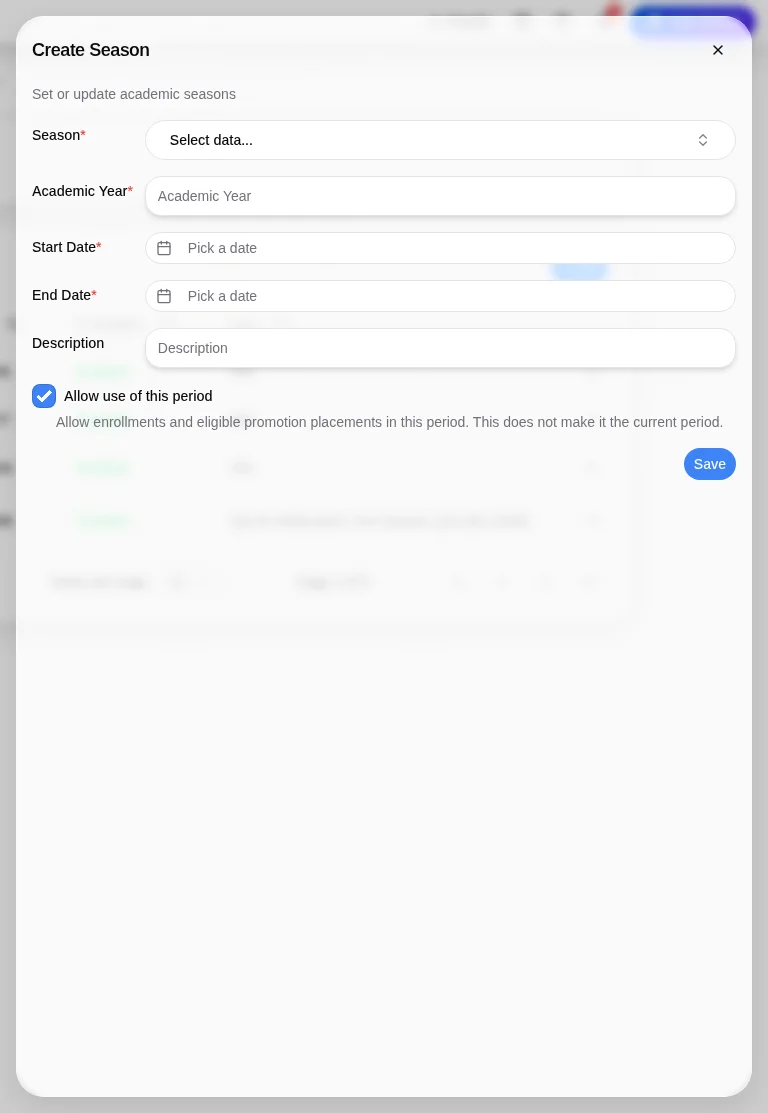
Open Manage School → School Setting → Seasons → + Add to open Create Season.
Complete required Season, Academic Year, Start Date, and End Date; review Description.
Review Allow use of this period (shown checked). Its help text permits enrollments and eligible promotion placements; it does not make the period current.
Review dates before Save; afterward check the period and availability. Saving, enrollment eligibility, and current-period behavior have not been tested.
Check the outcome
After an authorized action, check the intended record, placement and status. No saved-success outcome was observed; stop if results differ.
Troubleshooting
Missing controls can indicate a role or setup problem. Ask the school to verify your access; do not create duplicate records or delete data.