

Review student admission settings
· 2 min read
This guide describes the form controls observed in Rumahsekolah. Final saving and submission were not tested; check the actual result after any action.
Preparation
Use an authorized account and the intended school. Prepare approved information and avoid duplicate records.
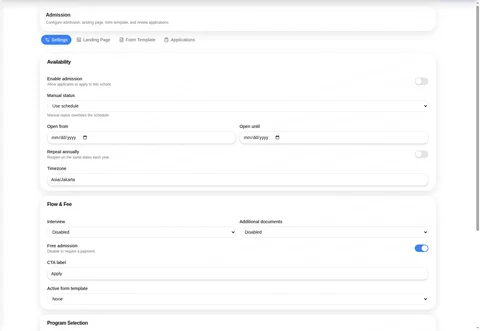
Open Manage School → Admission. Tabs are Settings, Landing Page, Form Template, Applications; only the documented settings and template controls were inspected.
In Settings, review Enable admission (observed off), Manual status (Use schedule, Force open, Force closed), Open from, Open until, Repeat annually (off), and Timezone (observed Asia/Jakarta; confirm your school’s intended zone).
Review Interview and Additional documents choices Disabled, Optional, Required; Free admission (on); CTA label (Apply); and Active form template (None or Default Student Admission Form (global)).
Review Open seasons, Major selection (on), Default major, Grade selection (on), and Default grade. Check all settings before Save settings; saving and public application behavior were not tested.
Form Template showed no school-owned templates and a global Default Student Admission Form marked 4 steps with Clone. Cloning was not tested. Applications provides Import and Manual Enrollment; neither submission was tested.
Check the outcome
After an authorized action, check the intended record, placement and status. No saved-success outcome was observed; stop if results differ.
Troubleshooting
Missing controls can indicate a role or setup problem. Ask the school to verify your access; do not create duplicate records or delete data.