

Panduan
Review teacher attendance status controls
· 2 min read
Review teacher attendance status controls
Use your own authorized account and intended school. This guide covers only the visible navigation or controls described below.
- Open the teacher
Kehadiranpage. It showsRingkasan Kehadiranand tabsSesi kelas/Per siswa. Session columns areMata Pelajaran,ID Kelas,Jadwal,Ruang Kelas,Modul,Kehadiran.
- In the observed attendance session row, a link opened its class room. The room provided
Peserta,Absensi, andChat. OpenAbsensito inspect the attendance panel; the inspected rows showedbelum absen.
- Each row had
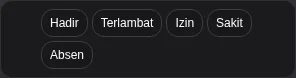
Ubah status kehadiran. Opening one menu displayedHadir,Terlambat,Izin,Sakit, andAbsen. The screenshot shows only these options, not student identities. Opening the menu did not change a status; no option was selected.
Sisanya alfawas visible as a bulk action, but was not clicked. Do not infer its confirmation or saved effects. Review affected students before any authorized change; this guide does not instruct applying that bulk action.
Persetujuan izinshowed0 menunggu; no request was opened or approved. Saving status, bulk effects and leave-approval outcomes were not tested. After an authorized change, check the actual status rather than assuming it saved.
Check the page or control actually displayed for your account. No completed submission, membership change or attendance change is established by this guide.
If an expected page or record is missing, ask your school to check access. Never share credentials or create duplicate accounts to bypass access.