

Panduan
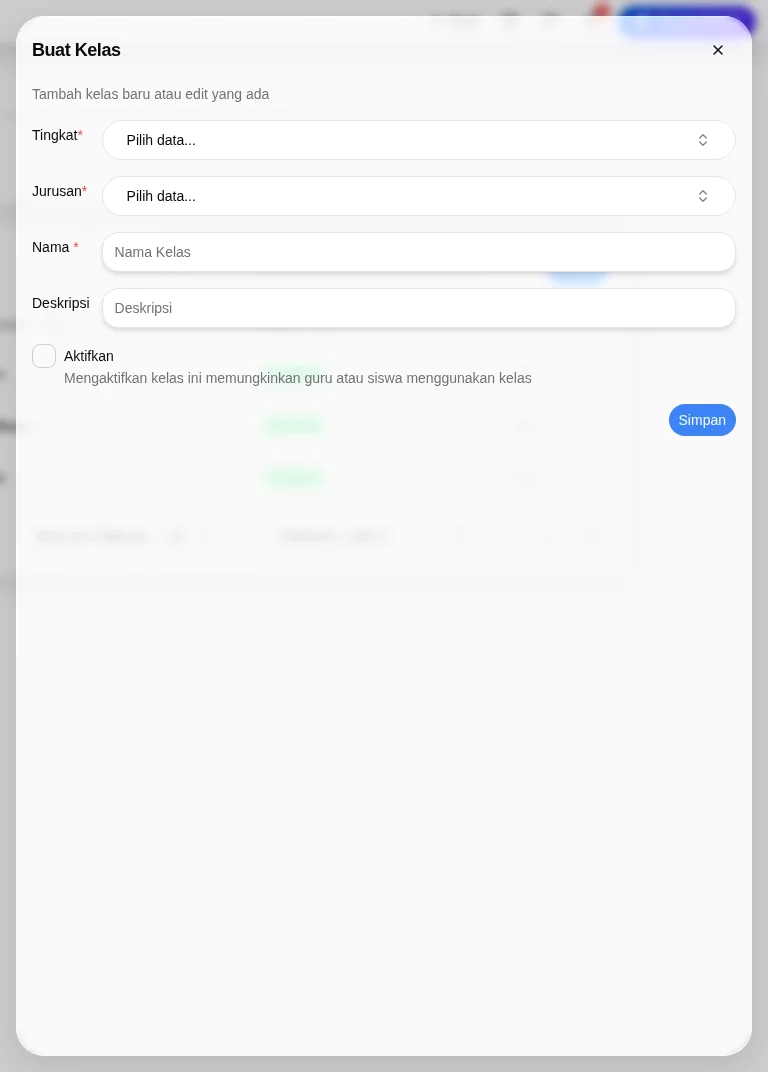
Fill in the class creation form
· 2 min read
Fill in the class creation form
Use an authorized school-admin account and the intended school. The observed interface labels are preserved below.
- As an authorized school administrator, open
Sekolah Saya→Kelola Sekolah→Pengaturan Sekolah→Kelas. Labels below preserve the Indonesian interface observed.
- The
Kelastab has columnsNama,Deskripsi,Jurusan,Status. Choose+ Buatto open the blankBuat Kelasdialog.
- Complete required
Tingkat,Jurusan, andNama. The first two are dropdowns showingPilih data...; the name field showsNama Kelas. Review optionalDeskripsi.
- Review the
Aktifkancheckbox. Its helper says enabling this class allows teachers or students to use it. Enabling behavior and later availability were not tested.
- Review the details before choosing
Simpan. The form was inspected blank and closed without saving, so no created record or saved status was verified. After an authorized save, check the actual list and entered details.
KelasandRuang Kelasare separate settings tabs. This form relates a class to an academic level and major; its relationship to classrooms, homeroom teachers, subjects and sessions was not tested. Do not assume a physical-room or session mapping.
Check the actual visible state. No successful save, activation, reset or access recovery is established by this guide.
If the expected control is unavailable, ask authorized school support to check your role and setup. Do not share credentials or create duplicate records.