

Mulai menggunakan
Sign up and verify your Rumahsekolah email
· 2 min read
Sign up and verify your Rumahsekolah email
Use an email address you control and a password you choose. Start on the public Live site, not the RC demo environment.
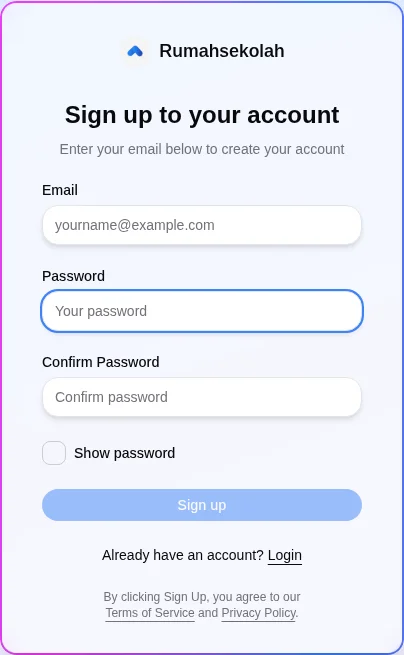
- Open https://app.rumahsekolah.com/sign-up. The form heading is
Sign up to your account. If you already have an account, useLoginrather than creating a duplicate.
- Fill in
Email,Password, andConfirm Password. Enter the same password in both password fields.Show passwordis available; use it only where others cannot see your screen. The password policy was not established by this observation; follow any validation the site displays.
- Review
Terms of ServiceandPrivacy Policybefore choosingSign up. The form states that signing up means agreeing to them.
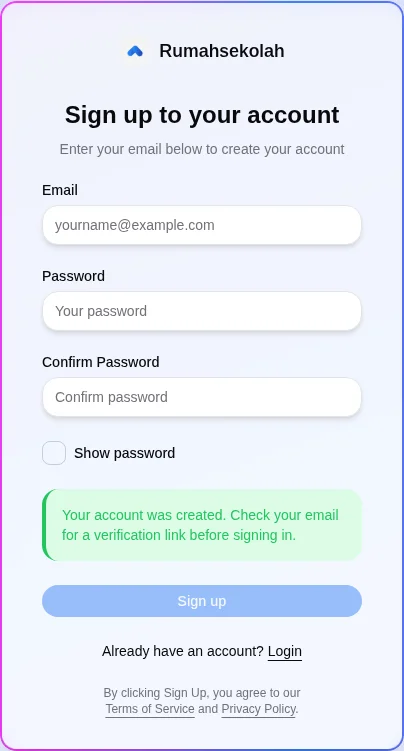
- Check the result. In the observed signup, the site displayed: “Your account was created. Check your email for a verification link before signing in.” If you do not see confirmation, check the displayed validation instead of assuming an account was created.
- Open the Rumahsekolah verification email in your own mailbox and follow its verification link. In the observed signup, opening that link succeeded and advanced to the blank
Profileonboarding step at/sign-up/profile.
- The next screen showed
Profile,Role, andSchoolstages. The blankProfilescreen includedFirst name,Last name,Username,Continue, andNot now — log out. No profile, role, or school details were entered during verification; this guide stops at that screen.
Check the result
The observed flow reached blank Profile onboarding after email verification. This does not establish completed onboarding, a school membership, or any school role. Check your own screen before proceeding.
If something differs
If the confirmation or verification result differs, follow the site’s displayed instructions. Email delivery timing, resend controls, expired-link handling, password rules and account recovery were not tested. Never share your password or verification link.