

Fill in the exam creation form
· 1 min read
This guide describes the form controls observed in Rumahsekolah. Final saving and submission were not tested; check the actual result after any action.
Preparation
Use an authorized account and the intended school. Prepare approved information and avoid duplicate records.
As a teacher, open Learning → Ujian → + Buat ujian to open Buat ujian.
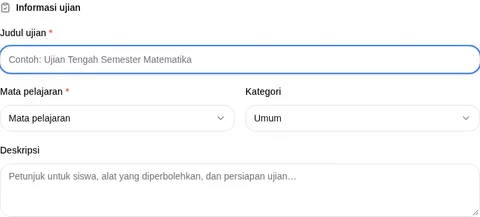
In Informasi ujian, complete required Judul ujian and Mata pelajaran; review Kategori (default Umum) and Deskripsi. In Pengawasan, review Pengawas (defaults to current teacher; no identity is included in screenshots).
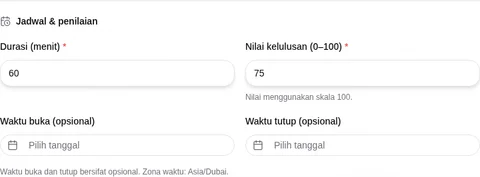
In Jadwal & penilaian, complete required Durasi (menit) (default 60) and Nilai kelulusan (0–100) (default 75). Review Waktu buka (opsional) and Waktu tutup (opsional). The form explicitly shows timezone Asia/Dubai.
The notice says the exam is saved as a draft before opening the question editor, with publication later from exam details. This behavior was not tested. Review before Buat dan buka editor (disabled in the blank form) or use Batal; check the actual draft status after an authorized save. Question editing, publication and student attempt controls remain unverified.
Check the outcome
After any authorized action, check the actual record and status. No successful saved outcome was observed.
Troubleshooting
Missing controls can indicate a role or setup problem. Ask the school to verify your access; do not create duplicate records or delete data.