

Find school administrator setup controls
· 1 min read
This guide describes the form controls observed in Rumahsekolah. Final saving and submission were not tested; check the actual result after any action.
Preparation
Use an authorized account and the intended school. Prepare approved information and avoid duplicate records.
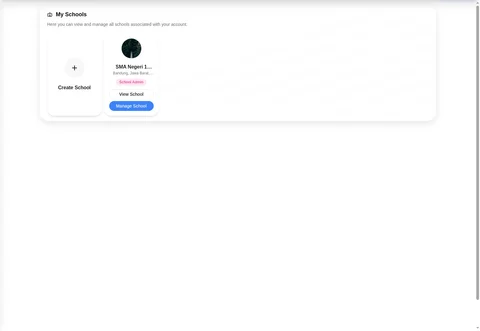
Use primary navigation Home, Learning, Schools, Messages. Open Schools → My Schools; a school card offers View School and Manage School, while Create School opens a new-school form.
In Manage School, the sidebar has School Summary, View School, and Management links Members, Students, Student Promotion, Subjects, School Posts, Admission, School Setting. A visible link is not evidence that its full workflow was tested.
Use the school-readiness guide for the observed settings forms. Members has Teachers, Staff, Administrators; Students has Active, Alumni, Suspended.
Learning navigation shows Dashboard, Subjects, Schedule, Attendance, Exams, Assignments, Reports, and the school-local Study Plan link. Learning actions, promotion, posts, and access-setting changes remain unverified.
Classes opens Upcoming classes, not a verified creation form. Use verified grade/classroom instructions only; check any authorized save outcome and never delete demo data.
Check the outcome
After an authorized action, check the intended record, placement and status. No saved-success outcome was observed; stop if results differ.
Troubleshooting
Missing controls can indicate a role or setup problem. Ask the school to verify your access; do not create duplicate records or delete data.